

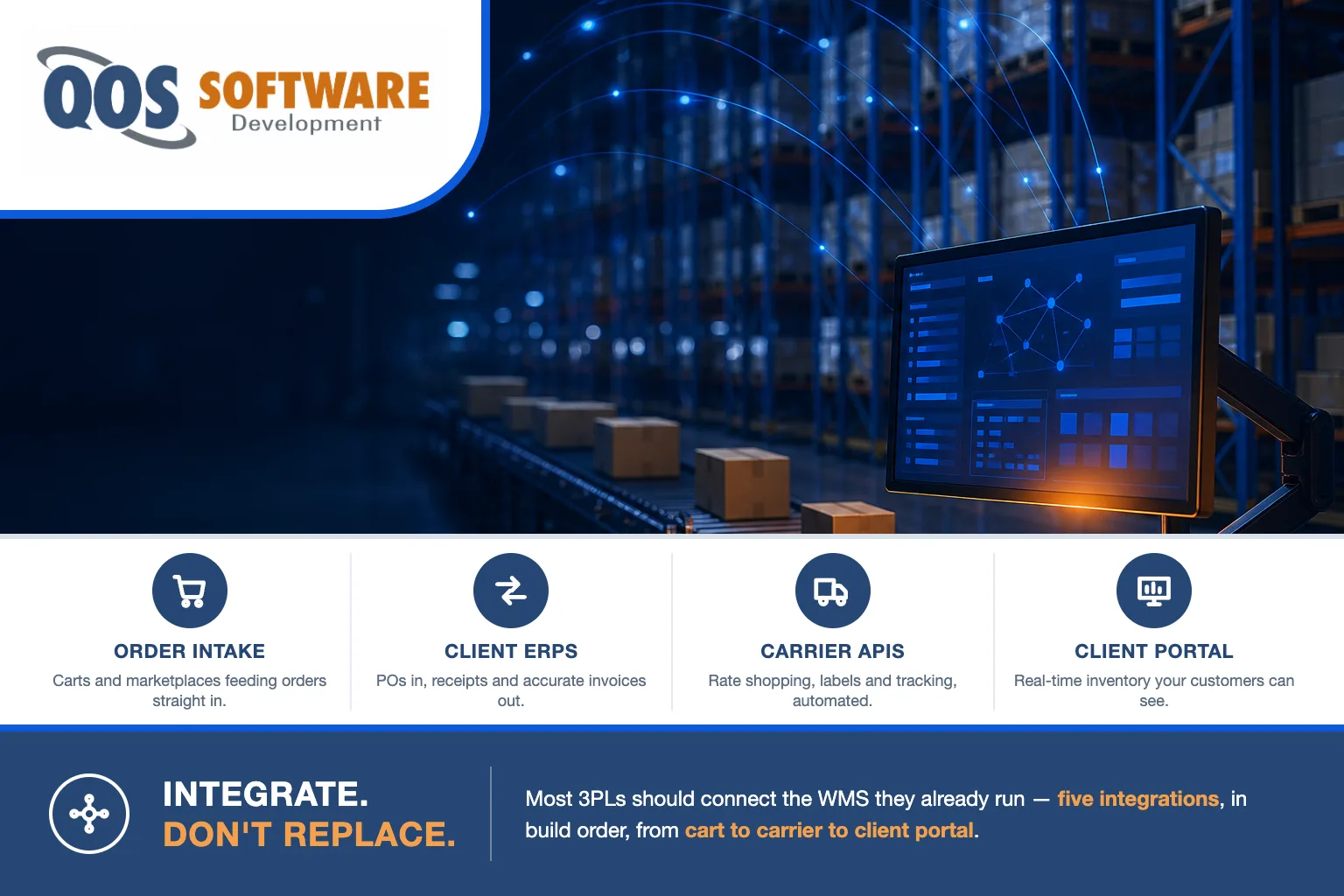
The 3PL integration checklist, in build order: WMS to shopping carts and marketplaces, WMS to client ERPs and billing, WMS to TMS and carrier APIs, a client-visibility portal, then robotics orchestration. Most 3PLs should integrate the WMS they already run — not replace it.
That is the order we would build them in, and the order matters as much as the list. Our take: in third-party logistics, the warehouse management system is not the differentiator — your competitor down the interstate can license the same one tomorrow. What separates 3PLs is how many of a client’s systems you can connect to, and how fast you can do it when a new account signs.
Below is each connection: what actually moves across it, why it sits where it sits in the order, and the part that goes wrong. We have built software for 3PLs and warehouse operations, and the same five seams come up every time.
Should you replace your WMS or integrate the one you have?
Integrate, in most cases. When a 3PL tells us its systems are a mess, the WMS is rarely the thing that is broken — the seams around it are. Replacing the WMS means retraining the entire floor, re-mapping every client’s data, running two systems in parallel for months, and freezing the project through peak season. That is a very expensive way to avoid five integrations.
There are real exceptions, though, and we will say so before you spend money with anyone. Replacement is genuinely the right call when:
- The vendor actively blocks integration. No API, no supported database access, and a licensing posture that treats every connection as a paid custom project. If the platform will not let data out on reasonable terms, you are not buying a WMS anymore — you are renting a hostage situation.
- It was never built for multi-client work. A single-owner warehouse system that cannot separate inventory, rates, and billing by client will fight you on every account you onboard. Bolting multi-tenancy onto the outside of it is not an integration project; it is a rewrite wearing a costume.
- It is end-of-life or unsupported. No security patches, a database version nobody will support, or a vendor that has stopped shipping releases. Integrating into an unmaintained system just gives the outage a wider blast radius.
- You have outgrown its physics. If a new client needs lot and serial tracking, wave or zone picking, or units of measure the system fundamentally does not model, no amount of middleware invents those capabilities.
If none of those four describe your situation, keep the WMS and build the five connections below.
1. WMS to carts and marketplaces: the order-intake seam
This is first because it is the revenue seam. How fast you can onboard a new e-commerce client is a sales number, not an IT number — if it takes six weeks of CSV wrangling to take your first order, you will lose accounts to a 3PL that does it in three days.
- Platforms to cover: Shopify, BigCommerce, WooCommerce, Amazon (including merchant-fulfilled), and Walmart Marketplace. Those five reach the large majority of the e-commerce brands that will ever ask you for a quote.
- Inbound to the WMS: orders, SKUs, ship-to addresses, requested service level, gift and packing instructions, cancellations and holds.
- Outbound to the storefront: available-to-promise inventory, shipment confirmations, tracking numbers, and short-ship or backorder notices.
- The part that goes wrong: inventory sync frequency. A fifteen-minute sync oversells during a promotion; near-real-time sync costs more to build and is what a brand running paid traffic actually needs. Decide that per client, in writing, before go-live.
- Build it once, not five times. Put one canonical order model in the middle and write connectors into it. Cart number six should be a two-day connector, not another project.
The storefront side of this — the cart itself, checkout, the brand’s own site — is a different discipline from the fulfillment side, and it is covered on our ecommerce development page.
2. WMS to client ERPs and billing: the onboarding seam
Second, because your larger clients do not run a cart — they run an ERP, and they will not change it for you. Every one of them speaks a slightly different dialect of the same conversation.
- Systems to cover: NetSuite, Microsoft Dynamics 365 Business Central, SAP Business One, and QuickBooks. Between them you will cover most mid-market accounts.
- Inbound to the WMS: purchase orders, advance ship notices, item masters, and customer masters.
- Outbound to the ERP: receipts, inventory adjustments, cycle-count results, and shipment confirmations.
Then there is the sub-seam nobody puts on a slide: turning WMS activity into an accurate client invoice. Storage billed by pallet, bin, or cubic foot on an anniversary or calendar cycle. Handling billed by touch — receiving, put-away, pick, pack. Value-added work like kitting, labeling, and returns processing. Accessorials and monthly minimums.
In our experience this is the least glamorous integration on the list and the one with the fastest payback, because it converts work you already performed into revenue you actually billed. Margin at a 3PL does not usually leak at the loading dock. It leaks between the WMS activity log and the invoice.
The shape of this problem is not unique to logistics — we wrote about the same pattern in dealership DMS data integration, where the system of record is equally immovable and the integration is therefore the entire job. Scoping which systems, in which direction, with who owning which credentials, is the work we do as API integrations.
3. WMS to TMS and carrier APIs: the shipping seam
Third, and this is the margin seam. The gap between the cheapest compliant service and the default service is small on one parcel and enormous across a year of them.
- What the connection does: rate shopping at pack time, label generation, address validation, tracking webhooks pushed back to the WMS and on to the client’s storefront, and end-of-day manifesting.
- Carrier-direct (UPS, FedEx, USPS): your negotiated rates, full control, no per-label fee. You also own every carrier’s API, certification process, and annual spec changes — that is real, recurring engineering work.
- Aggregator (EasyPost, Shippo, ShipEngine): one API for many carriers, far faster to add the next one, and a per-label fee plus a dependency you do not control. The right answer flips with volume: at low parcel counts the aggregator is obviously cheaper, and at high counts the per-label fee starts funding a direct integration.
- Freight is a separate handoff. A parcel stack does not do LTL and FTL quoting, bill-of-lading generation, or tender and accept. That is the TMS, and it is its own integration — do not assume the shipping module covers it.
One routing note: EDI VANs and managed carrier connectivity are not a build. Trading-partner onboarding, VAN mailboxes, and the network plumbing underneath them are managed-services work — that is QOS MSP‘s lane in the QOS family, and we hand that piece off rather than quote it.
4. The client-visibility portal: the retention seam
Fourth on purpose. A portal consumes the APIs you built in steps one through three — inventory, order status, receipts, tracking. Build it first and you have built a beautiful dashboard over data that does not flow yet, which is an expensive way to display yesterday’s spreadsheet.
- What clients actually ask for: real-time inventory by SKU and lot, order and shipment status with tracking, inbound and ASN status, self-serve reporting with exports, and per-client user roles so a brand’s own team can log in without seeing anyone else’s data.
- Why it is the retention seam: it removes most of the “where is my order” email traffic, and a client operations team that lives in your portal every day feels the switching cost long before the contract renewal lands.
- The honest check first: some WMS platforms ship a customer portal that is genuinely adequate. Look at it, put a real client in front of it, and only build if it fails them. Building a portal to replace a portal is the most common wasted project in this whole list.
When it does need building, it is a browser-based application with real users and real permissions — the discipline we cover under web application development.
5. WMS to robotics orchestration: the capacity seam
Fifth, and last, because it depends on everything above being reliable. The warehouse robotics market is projected to grow from $9.33 billion in 2025 to $21.08 billion by 2030, a 17.7% CAGR (SellersCommerce), and robotics-as-a-service is converting that capex into opex (Productiv) — which is the actual reason automation is now in reach of mid-tier 3PLs and not just national players.
The hard part is not the machines. It is the orchestration software, the WMS compatibility underneath it, and the change management on the floor. Before you sign a RaaS contract, confirm these:
- Can your WMS emit task-level work? Robots need discrete tasks. A WMS that only releases waves to a paper pick list has nothing to hand a fleet.
- Who owns the orchestration layer? The robot vendor, the WMS vendor, or you. Whoever owns it decides how work is interleaved between robots and human pickers, and that decision drives your actual throughput.
- What happens during an outage? Write down the manual fallback for a fleet that goes down mid-peak, and test it before you need it.
- Who trains and supervises the floor? Automation projects fail on adoption far more often than on hardware.
If you are weighing whether the automation pays for itself at all, the framework is the same one we laid out for the plant floor in manufacturing software ROI. And if what you are really after is predictive routing or AI demand forecasting rather than robots, that is a different vertical entirely — QOS Agentic owns AI and automation work in the QOS family, and we route it there.
What you can skip
The anti-sell section, because most of what gets pitched to 3PLs is not the thing that will move a number this year:
- A blockchain track-and-trace pilot. Unless a specific customer contract requires it, this has been five years of pilots and very few production systems.
- A control-tower dashboard, for now. Aggregated cross-client visibility is a genuinely good idea — after the five seams flow. Before that, it is a screen showing you data you are still keying in by hand.
- An IoT sensor mesh on every rack. Start with the handful of measurements you would actually act on. Most 3PLs never look at the rest.
- A custom mobile app for the floor. If the WMS scanner client works, the money belongs in the five connections instead.
- Replacing the WMS — unless one of the four exceptions at the top of this article genuinely applies to you.
- Hiring a permanent in-house integration team for five connections you will build once and then maintain. If you truly need long-term embedded developers rather than a project, that is staff augmentation and QOS Staffing handles it — a different engagement from a build.
We deliberately do not quote build prices inside a checklist, because the number depends entirely on how many clients, how many systems, and how weird their data is. What ranges look like across the market is in our custom software development cost guide.
Frequently asked questions
What is a 3PL technology stack?
A 3PL technology stack is the warehouse management system plus the connections around it. The WMS runs inventory, receiving, and picking. Around it sit integrations to client shopping carts and marketplaces, to client ERPs and billing, to a TMS and carrier APIs for shipping, a client-visibility portal, and increasingly a robotics orchestration layer. The WMS is the core, but the integrations are what make it usable for many different clients at once.
How does a 3PL integrate with Shopify or BigCommerce?
Through each platform’s order and inventory APIs, usually via a middleware layer rather than a direct point-to-point script. Orders, SKUs, addresses, and service levels flow into the WMS; available inventory, shipment confirmations, and tracking numbers flow back to the storefront. The detail that decides whether it works is inventory sync frequency: a fifteen-minute sync can oversell during a promotion, while near-real-time sync costs more to build. Agree on that per client before go-live.
What is the difference between a WMS and a TMS?
A WMS, or warehouse management system, runs what happens inside the four walls: receiving, put-away, inventory, picking, packing, and cycle counts. A TMS, or transportation management system, runs what happens once freight leaves: carrier selection, LTL and FTL quoting, bill-of-lading generation, tendering, and freight settlement. Most 3PLs need both, connected, because parcel shipping tools do not cover freight and a WMS does not rate a truckload.
Do mid-size 3PLs need warehouse robotics?
Not yet for most, but it is no longer out of reach. The warehouse robotics market is projected to grow from 9.33 billion dollars in 2025 to 21.08 billion by 2030, a 17.7 percent CAGR, according to SellersCommerce, and robotics-as-a-service converts the capital expense into an operating expense, per Productiv. The gating factor for a mid-size 3PL is rarely the hardware. It is whether the WMS can emit task-level work, who owns the orchestration layer, and whether the floor will adopt it.
Can you integrate a WMS that has no API?
Usually yes, with trade-offs. Flat-file exchange over SFTP is the most common fallback and is reliable but batch-based, so data is minutes or hours old. Direct database reads are faster and richer but can break on any vendor upgrade and may violate your support agreement, so get it in writing first. Screen-level or RPA automation works when nothing else does and is the most fragile of the three. A middleware layer in front of any of them keeps the fragility in one place instead of spreading it across every client connection.
Where to start
Pick the seam that is currently costing you deals. For most 3PLs that is number one or number two: either onboarding an e-commerce brand takes too long, or the invoice does not reflect the work the warehouse actually did. Fix one, completely, before opening the next. Completely means the seam runs unattended for a full billing cycle with nobody re-keying a fallback spreadsheet — that is the bar, not a demo that worked once on a Tuesday.
The cheapest useful thing you can do this week costs nothing: take your five largest clients and write down, for each one, what they send you, in what format, how it arrives today, and who re-keys it. That single page tells you which connection to build first, and it is the same page we would ask for on day one.
The honest trade-off: if you run two clients and a spreadsheet, none of this is your bottleneck yet — go win the third client. Integration work pays off when the manual handling is repeating across accounts, not before.
QOS Software builds the connective software between systems like these — we have been building software under QOS since 2007, nearly two decades of shipped projects. Today we work from Indianapolis and across the Chicago corridor, one of the densest 3PL markets in the country. If you want a second opinion on whether to integrate or replace, our API integrations page covers how we scope this work, and a short conversation will tell you more than another vendor demo — no cost, no obligation.
