
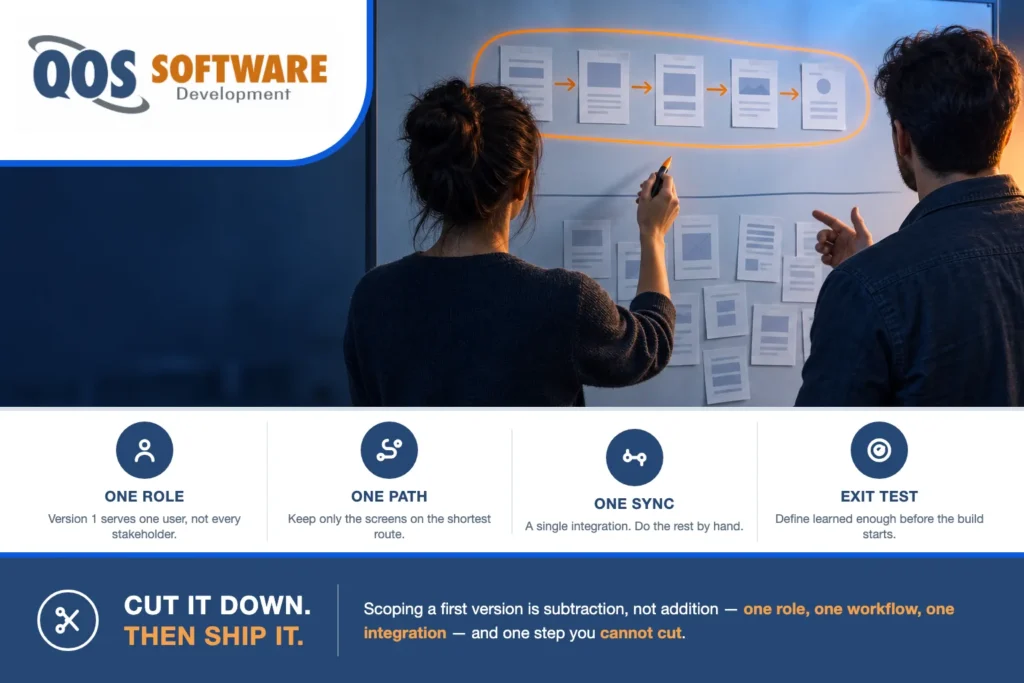
To scope an MVP, start from the one workflow a first user must complete end to end, then cut everything that is not on that path: extra user roles, second integrations, admin screens, reporting, and polish. A first version is one role, one workflow, and at most one or two integrations.
That is the whole rule. The rest of this post is the method behind it — how to scope an MVP in practice: why first versions bloat, why the prioritization technique most teams reach for makes the bloat worse, the five cuts in the order we make them, and the situations where an MVP is the wrong instrument entirely.
Why do first versions get too big?
Nothing about a first version is naturally small. An MVP is scoped by addition when it can only be scoped by subtraction, and almost every scoping meeting is built the wrong way round: everyone in the room is invited to say what they would need, nobody in the room is assigned to take anything out, and the list grows by roughly the number of people you invited.
The delay that follows is rarely measured in features. It is measured in decisions nobody made — whether the second role exists, whether the sync is live or nightly, whether the old report still matters. Each one sits open, each one blocks a screen, and the build ends up waiting on all of them at once.
The stakes are worth naming plainly. CB Insights’ analysis of 431 VC-backed companies that shut down since 2023 puts poor product-market fit at 43% — the most common root cause in that group. VC-backed startups are a narrower cohort than most people reading this; an operations lead commissioning an internal tool is not in that data. But the mechanism is the same one, and it is never a missing feature. It is a finished product nobody needed. A first version’s job is to find that out, not to be complete.
There is a quieter cost too. Every feature added before the first real user shows up is a feature added on a guess — and once it exists, you own it. It gets tested, maintained, migrated, and explained to every new developer who touches the codebase, whether or not the guess turns out to be right.
What belongs in an MVP — and what only looks like it does?
Three requests show up in nearly every first-version scope, and all three arrive sounding like requirements. They are the disguises scope creep wears.
The second user role. It enters as “the admin needs a screen too,” and it sounds like one more screen. It is not. A second role turns every screen into a permissions question, every list into a rule about which records that person is allowed to see, and every test path into two test paths. In a first version the admin work is almost always one person editing records by hand — slow, unglamorous, and completely sufficient for the handful of records version 1 will actually produce.
The second integration. It enters as “it has to sync from day one.” Each integration is its own mini-project — credentials, a sandbox, field mapping, error handling, retries, and a decision about what your software does while the other system is down — which is why integrations move a build’s price more than almost anything else on the list. One connection in version 1 is a scope decision. Two is a second project running in parallel with the first.
The parity trap. It enters as “the tool we’re replacing has a report for that.” Parity is the most reliable way to turn a first version into a full build, because the system you are replacing is the accumulated output of years of requests, most of which nobody would make again today. Ask who read that report last month. The answer is frequently nobody, and occasionally one person who would rather have had a spreadsheet.
So what does belong? The path — including the parts nobody puts in a demo: an error state, a way to correct a mistake, a way for a user to get back in after they close the tab. And then the part that is not negotiable. The one thing you cannot cut is the end of the workflow — the step where the outcome becomes real. The order actually submits. The record is actually saved. The next person is actually told. Software that goes ninety percent of the way down the path teaches you nothing, because no real user ever finishes it.
Why the usual prioritization method fails
Most teams reach for Must, Should, Could — or a two-by-two of value against effort. Both ask the same question, is this important?, and that question has no defensible no. Everything on the list is important to whoever put it there, so the exercise becomes a negotiation, and negotiations converge on yes. The predictable result is a list where nearly everything is a Must and the two items in Could are the two nobody cared about in the first place.
Replace it with a question that has a hard edge: does the first user’s path break without this? That is a yes-or-no question about a specific person doing a specific thing, and the list of yeses is always short. “No, but they would be annoyed” is a version 1.1 answer. “No, but somebody would have to do it by hand” is a version 1 answer too — do it by hand. The only yes that counts is the one where the user genuinely cannot finish.
How to scope an MVP in five cuts
Here is the method, in the order we run it. Each cut removes something specific, and each one buys back something specific: fewer roles, fewer integrations, fewer screens, and a first version that reaches real users in weeks instead of waiting on a quarter’s worth of decisions.
A five-cut method for reducing a first version to one user role, one workflow, and one integration, so it reaches real users in weeks and produces evidence instead of guesses.
Step 1: Name one user and one outcome
Write one sentence everybody signs: a [role] can [outcome] without talking to us. One role, one outcome, no conjunctions. If the sentence needs an and, you have two first versions rather than one. What you cut: every other role’s screens, and with them the permissions model that would have connected them. What it buys: the argument stops being about a feature list and becomes an argument about a single sentence, which takes days rather than weeks and produces a decision you can hold people to later.
Step 2: Draw the shortest path to that outcome and keep only the screens on it
Sketch the path that one user walks from start to finished outcome, then keep only the screens that actually appear on it. This is the thin slice, and it is usually four to six screens. What you cut: everything off the path, including settings, profile pages, admin screens, and dashboards, however standard they feel. What it buys: a version 1 small enough to design, build, and test inside a few weeks, and a scope that fits on one page you can hand to a developer.
Step 3: Cut to one integration and fake the rest
Pick the single connection the workflow cannot finish without, and handle every other system by hand. A CSV import, a manual export, or a value somebody copies in once a day is a legitimate version 1 integration, and it tells you whether that data flow matters before you pay to automate it. What you cut: the second and third connections, along with their credentials, field mappings, retry logic, and failure handling. What it buys: one integration to build and one to support, with the others already sitting on the version 1.1 list.
Step 4: Replace features with defaults
Anything that would be configurable in version 2 is a hard-coded choice in version 1. Permissions become one role. Reporting becomes an export. Notifications become email only. Configuration becomes a sensible default you can change later, in code, in an afternoon. What you cut: settings screens, role editors, template builders, and the storage behind all of them. What it buys: fewer screens, fewer test paths, and every flexibility decision deferred until a real user tells you which ones needed to be flexible.
Step 5: Set the version 1 exit test before you build
Define learned enough in advance, while it is still cheap to be honest about it. A workable test has two halves: a first user completes the whole workflow unassisted, and that same user comes back and uses it again without being prompted, inside a number of weeks you write down now. What you cut: the open-ended pilot that never resolves and quietly becomes the product. What it buys: a decision point with a date on it, and a defensible answer to whether version 1.1 should exist at all. If the open question is whether anyone will use this rather than whether it works in their day, a clickable prototype answers that before a line of code is written.
Three of those cuts have longer answers elsewhere. The one-page scope sheet in step 2 is the same sheet we use on web application builds. What a real integration involves in step 3 is broken down on our API and integrations page. And the clickable prototype in step 5 is design work rather than development, which is exactly why it can answer its question before any code exists.
What a version 1 scope looks like on paper
What the method produces is not a feature list. It is a cut ledger: every request that arrives gets a slot and a reason, and the reason is always the same test — does the first user’s path break without it? The units here are version slots, not budget.
| Feature request | Where it goes | The test that decided it |
|---|---|---|
| A second user role (an admin screen) | Version 1.1 | The first user completes the workflow without it. Until then, the admin work is one person editing records by hand. |
| A reporting dashboard | Later — an export in version 1 | Nobody’s path breaks for want of a chart. An export answers the same questions on day one, in a spreadsheet people already know. |
| A second integration | Version 1.1 | The workflow finishes with one connection. The second one syncs data nobody is reading yet. |
| Single sign-on | Later — email login in version 1 | SSO is usually a procurement requirement, not a path requirement — unless your first users genuinely cannot log in any other way. |
| A native mobile app | Never for version 1 — responsive web instead | The path works in a phone browser. An app adds store review cycles and a second codebase to a version you may throw away. |
| Notifications | Version 1 — email only | The path genuinely breaks without it: the next person in the workflow never learns it is their turn. |
| The report the old tool had | Never, unless a user’s path breaks without it | Parity with the system you are replacing is a habit, not a requirement. Ask who read it last month. |
Two properties make that ledger work. Every row has a destination, so nothing is rejected — only sequenced. And every row has a test rather than an opinion, so the decision survives the meeting where somebody senior disagrees with it.
What we standardize on a first version
Here is what we actually do on every first version we build, described plainly enough that you can run it yourself whether or not we are involved.
- A one-page scope sheet. Role, outcome, path, one integration, exit test. One page — and the page limit is the point, not the formatting. If the scope does not fit, it has a second workflow in it, and the honest move is to find that second workflow and name it.
- A weekly cut review. A standing meeting whose only agenda item is what came out this week. Every other meeting on a software project adds; this is the only one with a mandate to subtract. Without it the scope sheet is a document rather than a discipline, and the drift is invisible until the demo.
- The version 1.1 list as a first-class artifact. Written in the same document, in the same meeting, with the name of the person who asked for each item beside it. This is what makes cuts survivable — nothing is lost, only sequenced — and it means the person whose request moved can see exactly where it landed instead of assuming it was ignored.
- Senior developers across the whole build. Every developer on our team is a senior developer, US-based and offshore, with AI handling the junior-level work under their review. That composition is what lets a thin slice reach real users in weeks rather than quarters, because a small scope only ships fast when the people building it have seen the shape before.
The honest caveat on all of it: this is a forcing function, not a guarantee. It makes the cut decisions explicit and early. It does not make them painless — the weekly review exists precisely because the pressure to add things back never stops.
When an MVP is the wrong tool
Sometimes the correct answer to “what goes in our MVP” is that you should not be scoping one. Five situations point somewhere else entirely, and all five are cheaper to recognize now than in month four.
- Regulated workflows. When a regulator sets the minimum, the minimum is not yours to choose, and the first version is not small. Clinical documentation, financial reporting, records with statutory retention — the floor is written down somewhere, and you either build to it or you do not ship. That is an advisory question before it is a build question, and our sister company QOS Consulting, LLC does compliance-scoped assessments.
- Replacing a system the whole company already runs on. A “minimum” replacement that does sixty percent of what the old system does is not an MVP — it is a failed migration with a friendlier name, because the missing forty percent is somebody’s daily job. That work is phased modernization: both systems running, one workflow moved at a time. It belongs in enterprise software development, not in a first version.
- When the open question is whether it can be built at all. If the risk is technical rather than commercial — will this volume of data come back in time, will this device protocol behave, will the accuracy hold — what you need is a spike: a small, deliberately disposable experiment that answers one question and is then deleted. An MVP has real users. A spike has none, and does not need any.
- When the product itself is an AI agent or an automation workflow. That is a different discipline with different scoping rules, and it belongs with our sister company QOS Agentic rather than with a custom software build.
- When version 1 fits inside a product you can configure. If the first version really is a form, a queue, a status view, and an export, an off-the-shelf product very often carries it and you learn the same things sooner. That decision comes before this one, and we have written it up separately in custom software versus off-the-shelf.
And if the scope is settled but the builder is not, that is a different question with its own checklist — how to choose a software development company covers it, and we will not restate it here.
Frequently asked questions
What should be included in an MVP?
An MVP should include exactly the screens and steps one user needs to complete one workflow from beginning to end, plus the unglamorous parts of that path: an error state, a way to correct a mistake, and a way to get back in. It should not include a second user role, a second integration, a reporting dashboard, or single sign-on. The one thing you cannot cut is the end of the workflow, the step where the outcome actually becomes real, because software a user never finishes teaches you nothing.
How many features should an MVP have?
Count paths and roles instead of features. A first version should have one user role and one complete workflow, with at most one or two integrations. Feature counts mislead because a single feature can mean a checkbox or an entire permissions system, and two lists of ten features can differ by a factor of five in the work they take. If your list contains two roles or two workflows, you are scoping version 2 at the same time as version 1.
How long should an MVP take to build?
Weeks, not quarters. The honest signal is not a calendar figure but the shape of the plan: if the timeline runs past a single quarter, the scope almost always has a second workflow hidden inside it. The right correction is to cut back to one role and one path rather than to extend the schedule, because a longer first version delays the only thing it exists to produce, which is evidence from real users.
What is the difference between an MVP and a prototype?
A prototype is clickable but not real. It can be built by a designer with no back end behind it, and it answers whether people understand the idea and want it. An MVP is working software with real data, where a real user completes real work, so it answers whether people will actually use it and come back. If your open question is whether anyone wants this, prototype first. If your open question is whether it holds up inside somebody’s working day, build the MVP.
Can an MVP be built on an existing platform instead of custom code?
Often yes, and it is frequently the right answer. If version 1 is a form, a queue, a status view, and an export, a configured off-the-shelf product or a low-code tool can carry it, and you learn the same things sooner. Custom code earns its place when the workflow is the thing your business competes on, when a required integration has no supported connector, or when a compliance obligation cannot be configured away. A developer who will not tell you this is selling hours.
What happens after the MVP launches?
You run the exit test you wrote before the build started: did a first user complete the workflow unassisted, and did they come back without being asked. If yes, you start working the version 1.1 list, which is where the second role, the second integration, and the reporting went. If no, the correct next move is to change the workflow rather than to add features to it. Budget questions at that point belong on our pricing page, because a second version is priced on evidence rather than on guesses.
The short version
Five cuts, in order:
- Name one user and one outcome, in one sentence, with no conjunctions in it.
- Keep only the screens on the shortest path to that outcome — usually four to six.
- Cut to one integration and do the rest by hand, on purpose.
- Replace features with defaults: one role, an export, email only, a hard-coded choice.
- Write the exit test before the build starts, with a number of weeks on it.
The honest trade-off, and it is not a small one: a first version scoped this tightly will disappoint the stakeholder whose role got cut. The admin who wanted a screen, the manager who wanted the dashboard, the operations lead who wanted parity with the old report — each of them gets a version 1.1 line item instead of a feature. That disappointment is the method working. If nobody at the table is disappointed, you did not scope a minimum viable product; you scoped version 2 and wrote version 1 on the cover.
Once the scope is settled, the money questions come next. What a first version costs on our plans is on our pricing page, and the broader market numbers — what moves a quote up or down, and what a fair one has to include — are in our 2027 custom software development cost guide.
QOS Software is a founder-led team of senior developers, with AI handling the junior-level work so builds ship faster. We have been building software under QOS since 2007. Today we work from Indianapolis and the Chicago metro, and with clients nationally. If you want a second opinion on a scope you have already written, a short conversation will usually find the two things to cut. No cost, no obligation — and if version 1 turns out to fit inside a product you can configure, we will tell you that instead.
